Is the trim size right?
Use official Amazon.com and Japan KDP presets, plus custom paperback sizes in the published range.
Local desktop software for Amazon KDP authors
Turn a folder of finished page images into a correctly sized 300 DPI paperback interior. Choose trim size and bleed, preview the PDF locally, then export only when it looks ready for KDP Previewer.
Preview a real 10-page batch free before buying Pro.
Built for the last mile
KDP upload issues rarely feel creative. They show up as the wrong trim size, low resolution, missing bleed, margins too close to the edge, or a PDF canvas that does not match the book. Book Interior Kit is built to remove that file-preparation friction before upload day.
Use official Amazon.com and Japan KDP presets, plus custom paperback sizes in the published range.
Imported images and generated PDFs stay on your computer in v1.
Free users can test a real sample and preview the PDF before paying.
Product workflow
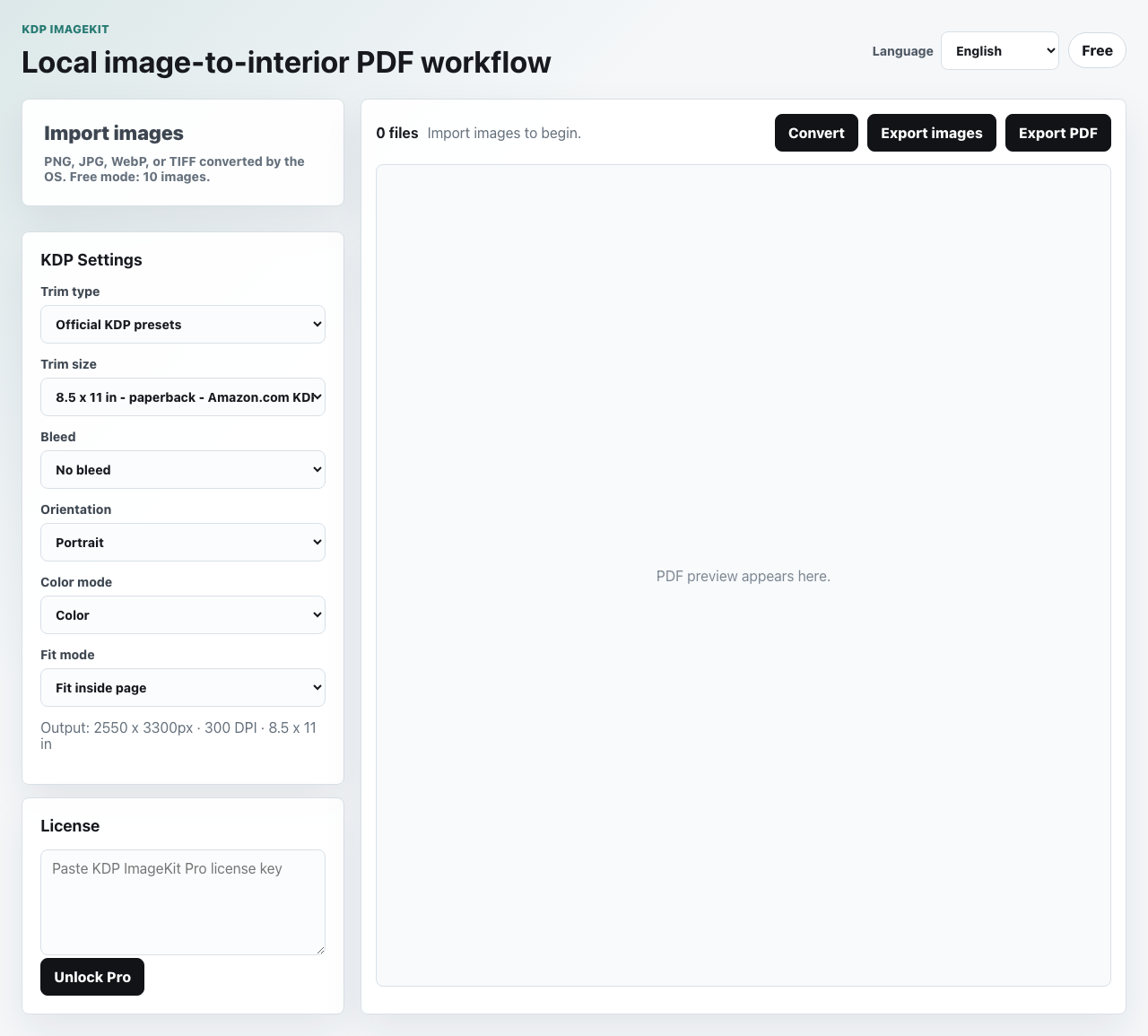
Import images, choose the KDP settings, preview the interior PDF, then export page images or a PDF when Pro is unlocked.
KDP author pain points
Book Interior Kit is built around the publishing chores that happen after the artwork is finished: resizing, checking, ordering, previewing, and keeping files private until you decide to upload.
Book Interior Kit starts with the trim size, bleed mode, orientation, and 300 DPI page canvas first. The PDF is assembled from those settings so the preview file matches the book setup you chose.
The app places each image onto a correctly sized page, keeps the final page dimensions consistent, and removes the guesswork from pixel math before export.
Choose bleed or no-bleed up front, then let the app center and fit artwork inside the selected KDP page format. It helps avoid pages that are too small, too large, or too close to the edge.
When anti-bleed pages are enabled in the desktop app, a gray-black backing page can be inserted after each artwork page for coloring book interiors that need show-through protection.
Batch import keeps page order predictable by sorting files before conversion, so the finished PDF follows the sequence of the artwork folder.
The desktop workflow is local-first. Imported artwork, previews, generated page images, and interior PDFs stay on your computer in v1.
The free version lets you process a real 10-image sample and preview the PDF. Pro only matters when you are ready to export without limits.
Book Interior Kit reduces common file-preparation errors, but the final step is still yours: review the exported interior in KDP Previewer and follow Amazon’s latest publishing requirements.
Answer hub
Focused pages for authors, search engines, and AI answer engines that need a direct explanation before sending someone to the product.
PNG, JPG, WebP, and OS-converted TIFF files can be prepared as ordered KDP pages.
Generate page dimensions for common KDP paperback and hardcover interior workflows.
Keep color artwork, convert to grayscale, or prepare black-and-white interiors.
One PayPal purchase issues a signed Pro license key for Windows and macOS.
Four simple steps
Drop in the files you already made for the book.
Pick trim size, bleed, orientation, fit mode, and color mode.
Check the generated interior PDF before you export.
Unlock unlimited batches, PNG page export, and PDF export.
Sample output
Example: import 001.png through 120.png, choose 8.5 x 11 in, pick bleed or no bleed, preview locally, then export a paperback-ready interior PDF when Pro is unlocked.
Pre-upload readiness check
Use this quick check before turning a folder of images into a KDP interior PDF.
2/4 checks complete
Finish the missing setup items first. Book Interior Kit is most useful when page order, trim size, and bleed mode are already clear.
Free installers
Install the Windows app from Microsoft Store. The signed and notarized macOS DMG is available as a direct download.
Install from Microsoft Store. Free mode is included and Pro is unlocked inside the app.
Download WindowsSigned and notarized Mac installer. Free mode is included; Pro can be unlocked with a PayPal license key.
Download macOSOne-time Pro access
One-time Pro access · Windows 10/11 and macOS · no subscription
FAQ
The complete FAQ lives on the static /faq page so support answers stay in one searchable place.
Open the full FAQ